


Design.com is what’s known as an unlimited design subscription service. Think of it like having an on-demand creative team ready to go, but without the headache and high cost of hiring someone in-house.
For a flat monthly fee, you can fire off as many design requests as you want. Need a new logo? Done. A fresh batch of social media graphics? No problem. Even full website mockups are on the table. This kind of model is a lifesaver for businesses that are constantly churning out creative work.
How Does Design.com Work?
Picture Design.com as a creative subscription box that shows up at your digital doorstep. But instead of getting random products, you get finished, ready-to-use design assets. You pick a plan that makes sense for your budget and the amount of work you have, send your ideas through their platform, and a team of designers starts turning those ideas into reality.
The whole point is to cut out the usual friction. No more hunting for freelancers on different platforms, haggling over prices, or managing a dozen different people for a dozen small jobs. It pulls all your creative projects into one predictable system.
The platform is built around a simple, step-by-step process designed to keep things moving. Figuring out this workflow is the best way to know if this service will actually work for you.
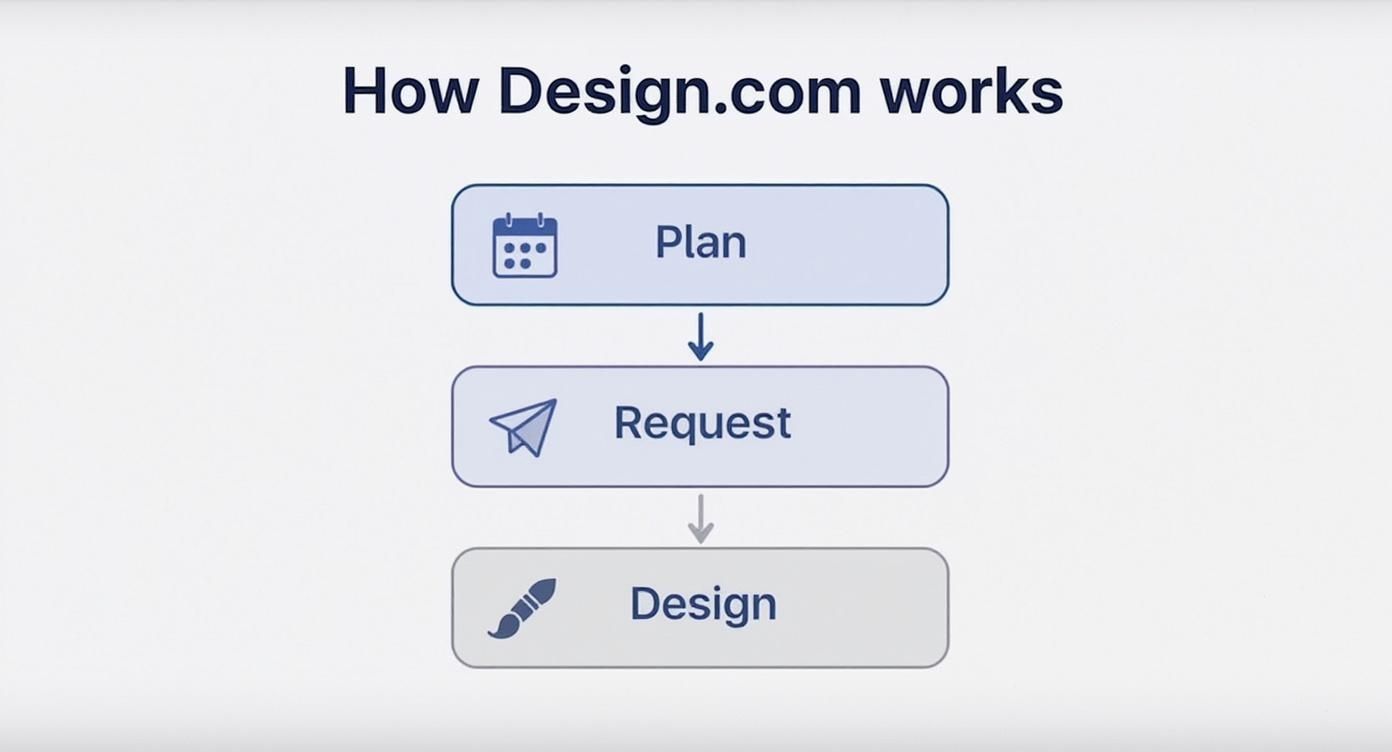
Here’s the typical path from a concept in your head to a finished design:
- Choose Your Plan: First, you sign up for a monthly plan. This is based on how much design work you think you’ll need. Each tier is a bit different, like how many projects you can have going at the same time.
- Submit a Design Brief: Once you’re in, you submit a request through the Design.com dashboard. A good brief is everything here—you need to be crystal clear about your goals, who you’re talking to, brand guidelines, and any other specifics for the designers.
- Collaborate and Revise: A designer grabs your request and gets to work. You can chat with them directly on the platform to give feedback and ask for changes until it’s just right. This back-and-forth is a core part of the service.
- Approve and Download: When you’re happy with the final result, you hit approve. All the files are then ready for you to download and start using straight away.
The real magic of Design.com is its asynchronous model. You can drop in requests and feedback whenever it suits you—day or night—while their designers keep the production line moving in the background. It creates a continuous workflow without needing to schedule a single meeting.
It’s also helpful to see where Design.com fits in the bigger picture. When you look at the leading AI marketing software options, you’ll notice a push for automation. While Design.com isn’t an AI tool, it solves a similar problem by offering a human-powered alternative for pumping out the high volume of creative assets modern marketing needs. With that in mind, we can dig deeper into its pricing, features, and whether it’s the real deal.
Design.com Pricing and Plans
Alright, let’s talk money. Understanding what you’re actually paying for is hands-down the most important part of figuring out if a service like Design.com is right for you. They use a tiered pricing model, which is pretty standard for these types of platforms.
Think of it like picking a cell phone plan. The basic plan gets you calls and texts, but if you want unlimited data and faster speeds, you’ve got to pay for a higher tier. Same idea here—the more you pay, the more design horsepower you get.
The main differences between the plans almost always boil down to two things: how many active requests you can have going at once and the turnaround time for each design. A basic plan might let you have one or two projects in the queue, which is perfect for a small business that just needs a steady drip of creative work. The bigger plans are built for agencies or busy marketing teams that need a constant firehose of designs and can’t afford to wait.
This model is everywhere in the creative services world, which is booming. The global Web Design Services market was worth an estimated $11 billion in 2023, so there’s clearly a massive demand for scalable design solutions like this.
A Closer Look at the Tiers
Choosing the right plan really comes down to matching it with your actual needs. It’s always a good idea to explore service pricing structures on different platforms just to see how they package their value. For Design.com, each plan is really built for a different kind of user.
For example, a solo founder might just need a few social media graphics and a quick landing page design each month. Since their needs are sporadic, a basic plan makes sense—they get the help they need without a massive monthly bill.
But a fast-growing e-commerce store running new campaigns every week? They need a constant stream of ads, email banners, and website updates. For them, a premium plan that supports a bunch of active requests isn’t a luxury; it’s essential to keep the business moving. You see similar value-packed models on platforms like AppSumo, which we cover in our AppSumo review.
The key is to be brutally honest about how much design work you actually need. Paying for capacity you never use is just burning cash, but a plan that’s too small will create frustrating bottlenecks and stall your projects.
To help you figure out where you fit, the table below gives a quick snapshot of what the different plans usually offer. Think of it as a cheat sheet to compare the core features and see who each tier is really built for.
Design.com Pricing Tiers at a Glance
| Plan Name | Best For | Key Features | Starting Price |
|---|---|---|---|
| Essential | Solopreneurs & Startups | 1 Active Request, 2-3 Day Turnaround, Standard Graphics | $499/mo |
| Pro | Small Businesses & Marketing Teams | 2 Active Requests, 1-2 Day Turnaround, Advanced Graphics & UI | $999/mo |
| Agency | Agencies & Large Companies | 4+ Active Requests, Same-Day Turnaround, Full Creative Suite | $1,999/mo |
This breakdown should give you a clear starting point. The names and exact features might vary, but the structure—moving from basic, single-task capacity to a multi-project, high-speed pipeline—is the core of how Design.com and similar services operate.
Pros and Cons of Using Design.com
Look, no service is perfect, and a real design.com review means looking at the good, the bad, and the just okay. Getting a feel for these trade-offs is the only way to know if this platform is actually going to fit into how you work. What’s a game-changer for one person is a deal-breaker for another, so let’s break it down.
On the surface, the subscription model feels like a breath of fresh air—no more back-and-forth haggling over freelance quotes. But the flip side is that you only get your money’s worth if you’re constantly feeding the machine with clear, well-defined tasks.
Pros: Key Advantages of Design.com
Honestly, the biggest win here is convenience. Having a design team essentially on-call without the headaches of payroll, benefits, or HR is a massive plus for businesses of any size. It boils down to a few key benefits.
- Quick Turnarounds for Simple Jobs: Need a bunch of social media graphics, blog headers, or basic ad creatives? This is where the service shines. It’s often way faster than finding, vetting, and briefing a new freelancer for every little thing.
- A Whole Team of Skills: Instead of trying to find separate people for illustrations, UI tweaks, and print layouts, your subscription opens up access to a team that can handle a bit of everything.
- Budgeting Made Easy: That flat monthly fee is a beautiful thing for financial planning. You know exactly what you’re spending on design each month, which helps you avoid those nasty surprise invoices that can blow a project’s budget.
Think of Design.com as a production engine. Its real strength is churning out a high volume of straightforward creative assets. It’s built to take a steady flow of requests and turn them into finished designs with as little fuss as possible.
This model is a lifesaver for businesses that need a constant stream of marketing materials. Say you’re building out a big campaign with tons of visuals, like a series of affiliate marketing landing pages. That requires dozens of assets, and that’s exactly the kind of workload a subscription service is made for.
Cons: Potential Drawbacks to Consider
Of course, this model has its limits. The whole “asynchronous” communication thing—where you submit a brief and wait—is efficient for some, but it can be a real roadblock if you’re used to real-time brainstorming calls.
Another thing to watch out for is the learning curve in writing a good design brief. The final product you get is almost entirely dependent on the quality of the instructions you provide. If your requests are vague, expect more back-and-forth revisions and slower delivery.
- Not Great for Complex Projects: Big, strategic stuff like building a brand from the ground up or a deep, nuanced website overhaul can be tough. Those projects really need live, in-depth discussions that this platform just isn’t designed for.
- Designer Roulette: While you have access to a pool of designers, you might not get the same person every time. This can lead to little inconsistencies in style, especially if your brand guidelines aren’t rock-solid.
- No Live Collaboration: If your creative process involves getting designers and stakeholders on a Zoom call to hash things out together, you’ll have to completely change how you work. That’s just not an option here.
At the end of the day, you have to weigh these pros and cons against your own needs. It’s the only way to figure out if Design.com is a genuinely useful tool for what you’re trying to accomplish.
Design.com Reviews: What Real Customers Are Saying
Marketing materials and official websites will always paint the perfect picture. But to get the real story, you have to dig into what actual customers are saying. A proper design.com review isn’t complete until you hear from the people using it day in and day out.
I’ve spent time combing through feedback on platforms like G2, Capterra, and Trustpilot to find the common threads—both the good and the bad. This is the unfiltered truth that shows you what it’s really like to work with them, moving beyond promises to see the actual results.

What Users Consistently Praise
The biggest win I saw mentioned over and over is how reliable the platform is for steady, ongoing design work. If you’re a business that needs a constant flow of graphics for marketing campaigns or social media, the subscription model just makes sense—it’s both cost-effective and efficient.
These are the strengths that kept popping up in positive reviews:
- Predictable Budgeting: People love the flat monthly fee. No surprise invoices, no nickel-and-diming. It makes financial planning a whole lot simpler.
- Speed for Simple Tasks: Need a social media post or an ad creative knocked out quickly? Users frequently praise the fast turnaround times for these kinds of straightforward requests.
- Convenience: The ability to submit a request anytime, without the hassle of finding and vetting freelancers, is a massive time-saver for busy teams.
Common Frustrations and Criticisms
Of course, no service is perfect, and the reviews definitely highlight a few common frustrations. One of the most-mentioned issues is the occasional inconsistency in design quality. Since you might be working with different designers, getting that brand aesthetic just right can sometimes be a challenge.
Other recurring pain points include:
- Communication Gaps: The asynchronous communication model is efficient, but it can lead to misunderstandings. This is especially true for complex projects where a real-time conversation would be more helpful.
- Vague Briefs Lead to Delays: Some users pointed out that if their initial design briefs aren’t super detailed, the back-and-forth revision process can drag on and become frustrating.
“I love the speed for my daily ad creatives, but getting the designer to understand our specific brand vibe took a few tries. Once we dialed in our brand guidelines and provided better examples, the process got much smoother.” – Anonymous G2 Reviewer
This quote nails it. The quality of what you get back is directly tied to the quality of what you put in.
Despite some of these issues, the platform’s popularity is hard to ignore. The engagement metrics are pretty telling. In just one month, the site pulled in around 5.33 million visits, with users spending over eight minutes per session on average. That shows a really engaged user base. You can explore more about Design.com’s web traffic on Semrush. This level of activity suggests that for a lot of people, the value they get far outweighs the occasional hiccup.
Is Design.com Legit? My Final Verdict
Alright, we’ve picked apart the workflow, crunched the numbers on pricing, and listened to what real users are saying. Now for the big question in this design.com review: Is it the real deal?
The short answer is yes, Design.com is a legitimate service. But—and this is a big but—it’s definitely not the right fit for everyone. They are a well-known company in the unlimited design space with a large team of professional designers and a solid track record.
This is a subscription service that does exactly what it promises: unlimited design requests. For the right kind of business, it can be an absolute game-changer. But its real value hinges entirely on your specific needs and how you get work done.
Who Is Design.com a Perfect Match For?
Design.com really shines for businesses that need a steady, high-volume stream of day-to-day graphic design. Think of it less like a boutique creative agency and more like a dependable production line for your creative assets.
This service is a fantastic fit for:
- Marketing Teams: If you’re constantly churning out social media graphics, ad creatives, email banners, and blog images, the predictable cost and output are a huge win.
- Agencies: Creative agencies can offload the bulk of their clients’ routine design tasks here. This frees up their in-house talent to focus on bigger, more strategic work.
- Content Creators: YouTubers, bloggers, and course creators who need a constant supply of thumbnails, worksheets, and promotional graphics can really streamline their production.
The core strength of Design.com is its ability to act as a reliable, on-demand creative engine. If your design needs are more about quantity and consistency than deep, strategic brainstorming, this model was practically built for you.
Who Should Probably Look Elsewhere?
On the flip side, that production-line approach has its limits. It’s not built for every kind of creative project, and some folks will be much better off hiring a traditional freelancer or a full-service agency.
You might want to explore other options if you’re:
- Needing a One-Off Project: A subscription is just overkill if you only need a single logo or a one-time website refresh. It’s simply not a cost-effective way to get that done.
- Requiring Deep Strategic Branding: Building a brand from scratch is an intense process. It requires live collaboration, brainstorming workshops, and strategy sessions that just don’t fit into the asynchronous, ticket-based model of Design.com.
- Someone Who Prefers Live Collaboration: If your creative process thrives on real-time feedback calls and bouncing ideas off your designer live, this platform is going to feel pretty restrictive.
Ultimately, figuring out if it’s right for you comes down to a bit of self-assessment. Knowing what to look for is key, and our guide on how to write product reviews can help you frame your own needs more clearly. Design.com is a powerful tool, but only if it’s the right tool for your specific job.
Still Got Questions About Design.com?
Even after digging into the details, you might have a few questions rattling around. Let’s clear those up with some quick, straight-to-the-point answers to what most people ask before they jump in.
How Does Design.com Actually Work?
Think of it like a subscription to a design production line. You pick a monthly plan that sets the number of design requests you can have in the queue at any given time.
You submit a brief through their platform, a designer grabs it, and a little while later, you get a draft to look over. The whole thing is asynchronous—which is just a fancy way of saying there are no meetings. All the back-and-forth happens with comments right on the platform until you’re happy, then you just download your files.
Is Design.com Legit and Safe to Use?
Absolutely. Design.com is a well-known company in the unlimited design world. They’ve got a big team of professional designers and a solid track record. Plenty of businesses, from tiny startups to massive marketing departments, rely on them every day.
But “legit” doesn’t automatically mean it’s the right choice for you. The real question is whether its subscription model and hands-off, asynchronous workflow fit how your team operates. For some, it’s a game-changer; for others, not so much.
Can I Get a Refund If I’m Not Satisfied?
Generally, no. Most of these unlimited design services, including Design.com, don’t offer refunds for the month you’ve paid for. You’re paying for access to the service and the designer’s time, not just the final file.
What you can do is cancel anytime. This stops you from getting billed for the next month, so you’re never locked into a long-term commitment. It’s always a good idea to skim their latest terms of service before you sign up, just to be sure.
What Kind of Designs Can I Request?
The platform is geared toward the everyday design tasks that keep a business running. Think of things like:
- Digital Stuff: Social media graphics, banner ads, email headers, and images for your blog posts.
- Branding Basics: Logos, business cards, and simple brand style guides.
- Web & App Mockups: UI/UX designs for websites, landing pages, and mobile apps.
- Print Materials: Flyers, brochures, and event posters.
Just keep in mind, it works best for clearly defined, single-asset jobs. It’s not really built for those sprawling, strategic projects that need a lot of deep collaboration and brainstorming sessions. As you’ll find in almost any design.com review, the clearer your request, the better your results will be.
Ready to streamline your design workflow and get consistent, high-quality creative assets on demand? The strategies and systems discussed here are just the beginning. At Daniel Proctor, we provide the mentorship and step-by-step guides to build profitable online ventures. Learn how to apply these principles to your own business by visiting https://danielproctor.com today.
